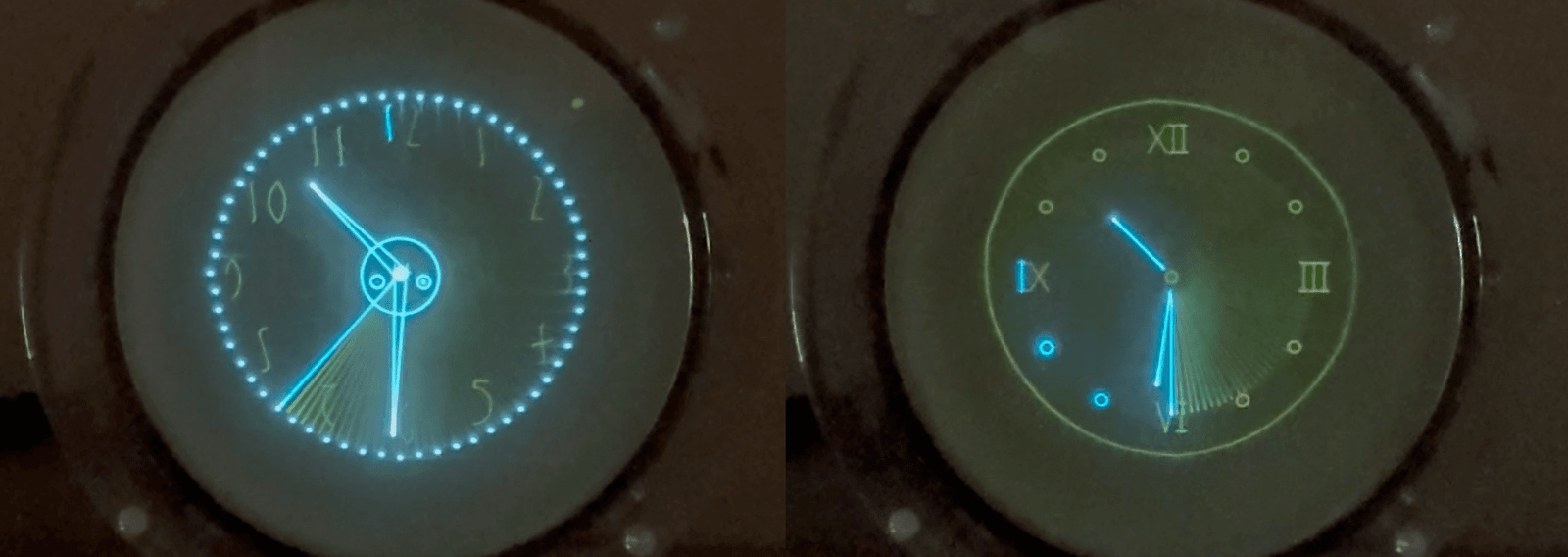
Nestled amongst the standard features that come with all Oscilloclocks is a special effect called “Slow motion”. We suspect very few owners have noticed this feature, and fewer yet have actually tried it! It hasn’t been very well advertised… Until now!
This Exo really likes the slow life!
No, this video is NOT just being played back slowly.
It’s the graphics rendering itself that
has
been
slowed
down…
Welcome to the Slow motion feature!
What is it doing?
As described in Circle Graphics, every image and character shown on your Oscilloclock is constructed from segments. Each segment is actually an ellipse, arc or a line.
Normally, an image (or text) is displayed on the screen by drawing its segments very quickly, all within the time of one frame. Each frame is completely redrawn 50 times per second. By repeating the drawing so rapidly, and adding in some persistence effects of the CRT phosphor, the human eye can’t see individual segments being drawn.
But when “slow motion” is enabled, only one segment is displayed per frame. For an image or text with 50 segments (at 50 frames per second), it would take 1 second to draw the entire image. At this rate, the eye can easily distinguish each segment as it is rendered!
Even the original Prototype from 2009 boasts this glorious feature!
Enabling slow motion
It’s in the menu!
Menu → Effects → Slow mo delay
A delay value other than 0 turns on the effect. This number indicates the number of frames that each segment will be displayed, before moving on to the next segment. Increasing the number therefore makes for a “slower” rendering of the image.
In the above videos, the delay was set to 1. Here’s what it looks like when set to 10!
Hybrid fast & slow motion!
In the videos so far, you’ve seen the slow motion effect applied only when rendering characters – numbers and text.
This is by design! Most graphics, figures, and images are intentionally left unaffected, so we can enjoy hybrid screens, like the below two examples!
Hybrid slow motion – graphics are fast; numbers and text are slow!
Phosphors and persistence
At this point in the article, dear Oscilloclock owner, you must have tried out the feature on your own device – and you probably noticed a key difference in behaviour…
No doubt you could observe the individual segments being drawn, but they disappeared so rapidly that you couldn’t catch the entire image!
What’s going on? Were all those cool videos above doctored in some way?
Absolutely not!
This P1 phosphor isn’t very persistent…
The difference is the phosphor in your CRT. Most Oscilloclocks to date have shipped with a green P1 or P2, blue P11, or amber P12 phosphor CRT. These are all beautiful phosphors, but they are relatively “fast”. They emit light quickly and brightly when struck by the electron beam, but they have very little persistence; the light fades relatively quickly.
Enter the P7 phosphor! This incredible chemical first fluorescences (lights up) in a pale violet/blue colour, and then phosphoresces (persists) for some time in a yellow colour!
Are you into slow food? Enjoy the slow life? Want to slow down even more? This feature is for you. Sit back, relax and watch electrons traveling at the speed of light actually form characters on your Oscilloclock!
Hi! I’m Oscilloclock Exo serial 20009-01, born 30 August 2025. Over the past few months, I’ve been cast, machined, etched, soldered, sprayed, assembled, crimped, wired, and every other verb you can imagine.
When I was first turned on in the lab, you can’t imagine my joy – I felt ALIVE again!! After decades of darkness, my filament fired and my phosphors flared. I was reborn.
But – I was tired.
My builder took several months to hand-craft me. It’s a bit exhausting really, seeing all your components strewn out along the workbench. Knowing that you’re months, then weeks, and then just days away from achieving nirvana.
So – my builder took me on a holiday! We went to Switzerland. He showed me to a few people. It was great to be fussed over! We took lots of photos in rooms, against scenic backdrops, and even in a bathtub (empty of course).
I had a great break, and now I’m back in the lab. I’m being given a few more tweaks and then I’ll be moving into a new house. I don’t know what it’s like there, but I heard my owner can’t wait to see me.
Boy, I love all this traveling.
My builder said it’s fun to share photos with others. So I’m going to leave these here. I hope you enjoy them!
Me in the hotel room. I’ve never seen such a nice place!What a view – I couldn’t believe it!My builder forgot to bring a long extension cable – he’s so forgetful! This “paragliding” things looks fun. Maybe next time I’ll have a battery pack so I could try it.
Apparently it was hard to get the lighting “just right”! But I brightened up and tried my best.
This bed was sooo soft, compared to that hard maple workbench!Photo shoots are really tough work. It felt goooood to get in the bath!
DISCLAIMER: I did this for a joke. NEVER put me in a bath or anywhere near water!!
Oh, I almost forgot to mention: my builder said that although he’s super busy, you can reach out to him if you want. Apparently, I have many brothers and sisters awaiting the chance that I got! But he hand-crafts us only after securing a loving new home. He looks after us like that.
Exo 20009-01 out.
Sep 6 2025 – it was the best day of my (so far seven day) life!
Recently, [Justin] asked: Can his beautiful Tektronix 606 XY monitor be made to work as a computer display?
And even more recently, [TJ] explained he has a plethora of Tektronix devices, and asked how he might put them to use…
So lovely… but what can you DO with it?
Well, “putting to use” is precisely what we do here at Oscilloclock! And one option, indeed, is to hook the target device up to a modern-day PC and use it as a computer monitor.
Time for an update on the Oscilloclock VGA Core and its variants!
Shades of Grey Green
Avid readers may recall these previous posts about making SVGA and XVGA displays from vintage oscilloscope CRTs:
Truly dedicated readers may even recall that the solutions presented drive the CRT directly, completely bypassing any internal circuitry of the host device. And, that there were limitations in the current design; the most serious being binary blanking, where the beam is switched either on or off. There were no shades of grey.
This Running Man needs no shades!
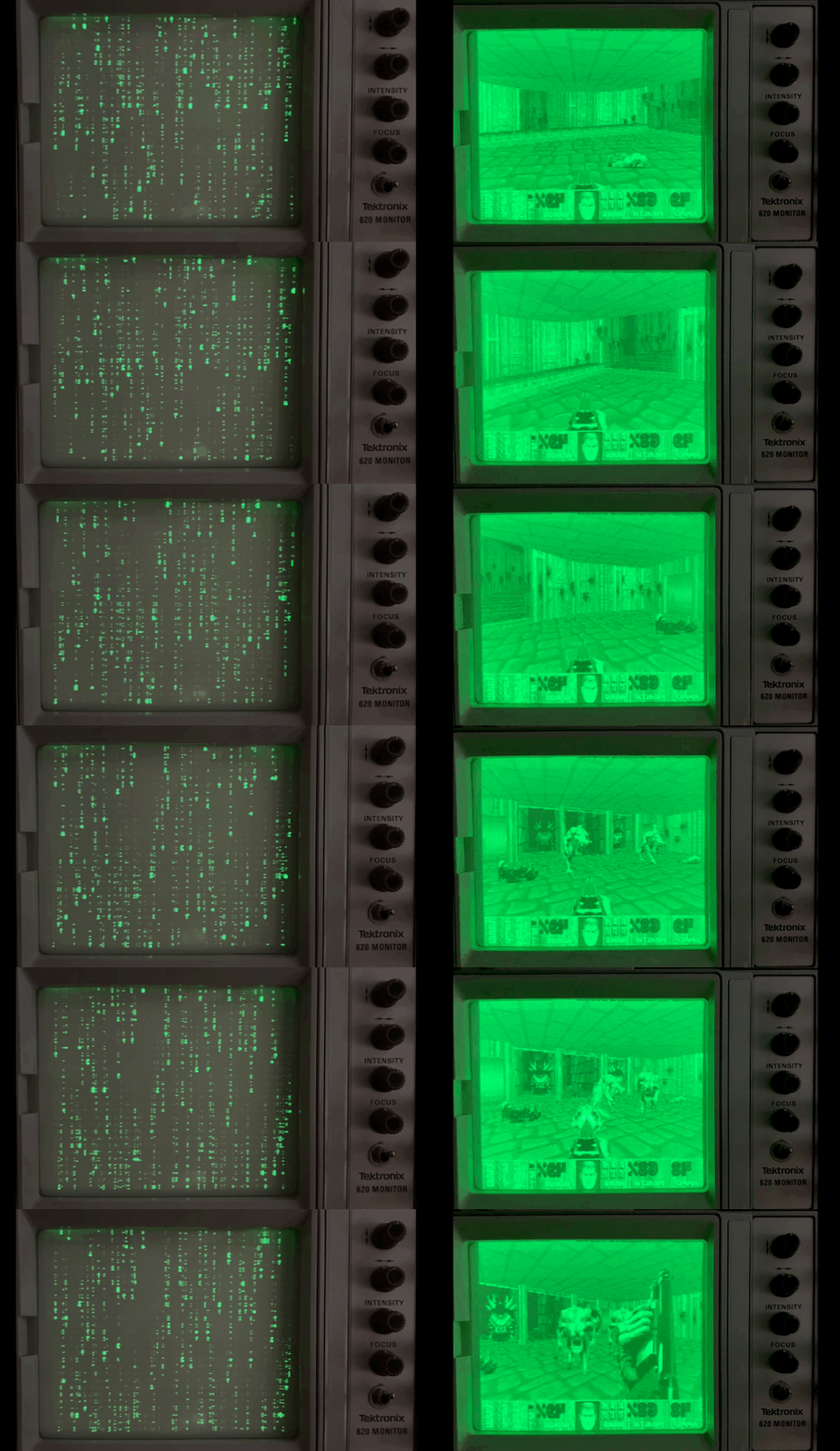
Inspired by [Justin], we experimented connecting the Oscilloclock VGA Bare (a barebones VGA interface board) to our lab’s Tektronix 620 XY monitor. This bad boy has an analog Z axis (intensity) input, meaning that we can theoretically have shades of grey… er, green.
And the result? A pretty decent PC display!
A recent post, as displayed on the Tektronix 620. (Yes – I know it’s upside down)Here’s what it looked like on the laptop’s display
Doomy Demo
Ever wanted to play classic Doom on an old green screen? Here we go!
This Tek 620 is no longer doomed – it’s been Doomed!
Yes – the display is horizontally inverted. The VGA Bare currently does not support flipping the X and Y signals.
This unintended challenge makes playing Doom exceptionally difficult!
Matrix Masterpiece
Who could resist displaying digital rain (Matrix code) on an old Tek display?
Matrix code, as generated by tmatrix. Note it’s horizontally inverted
While working on this demo, I learned more about Matrix code – and that it includes Japanese characters scanned from the creator’s wife’s cookbook. Wow, I thought those raindrops looked awfully familiar!
The Setup
Not a bad result! And the hardware setup was simple.
PC
HDMI to VGA adapter cable
Oscilloclock VGA Bare
BNC cables and connectors
A few resistors
Power pack
As always, nothing is perfect! A few tricks were needed to make the experiment a success:
The VGA Bare circuit needed a few minor improvements, to better support official SVGA and XVGA timing standards
A crude level adjuster (resistive divider network) was needed between the analog intensity output and the Tek’s Z axis input
The PC display resolution needed to be set to SVGA (800 x 600) or XVGA (1024 x 768), to give maximum clarity
A high-contrast theme was selected, to greatly improve display contrast
What’s next?
With the successful close of this proof-of-concept, [Justin] and [TJ] now have another clear option to make use of their vintage test equipment: a VGA Bare ready to mount inside their device, or a beautifully encased VGA Connect (à la Oscilloclock Connect).
But to make this truly production-worthy, a few improvements are needed:
Output voltage level adjustments, fully independent for X, Y, Z
A higher-voltage Z amplifier
Independently invertable X and Y signals
Reduction in the ‘ghosting’ or ‘ringing’ effects currently observed
Improved contrast and avoidance of ‘washout’ seen between pixels
Digital HDMI input !
… all added to Oscilloclock’s ever-growing backlog of things to do!
Do you want to play your favourite classic game on your old XY monitor? Do you want to stack 10 oscilloscopes on your shelf and have them all showing Matrix code? Or put your Grandpa’s old scope on your desk at work and have it display your Outlook calendar?
Our mantra makes it possible: Just. Because. We. Can.
Here at the Oscilloclock lab there’s nothing more pleasurable than helping put a cherished vintage oscilloscope back into action. A new lease on life!
That’s why when [Chris] reached out about his early 1970’s Conar 255 oscilloscope, wanting to convert it into a Vectrex gaming machine, we were naturally excited!
The original Vectrex was an incredibly cool device. Instead of the pixelated, blocky graphics of the time (anyone remember Pac-Man?), the system used vector graphics to draw smooth line-art images. Each vector was a straight line, or a smooth arc, connecting point A to B. Vectrex games were true works of art, and the original hardware is quite rare (and $$$)!
Well, [Chris] caught the vector graphics bug. But he decided to build a Scopetrex – a hardware emulator that allows you to run Vectrex games on an oscilloscope! He would theoretically just connect this to the Conar 255’s existing X, Y, and Z (blanking) inputs.
We like this “minimum invasion, maximum re-use” approach. We’ve gone down this route numerous times to craft Oscilloclocks out of still-usable hardware. (The alternative? Install a full set of modern boards that drive the CRT directly.)
Sample specimens of “minimum invasion, maximum re-use”
[Chris] got down to planning. He could interface the X and Y inputs easily. But he faced a problem with the Z (blanking, or intensity modulation) signal, which instructs the scope when to turn the beam on and off:
The Scopetrex outputs a 5V DCdigitalblanking pulse.
The Conar requires at least 20V peak-to-peak blanking signal – and employs analog AC coupling.
We’ve solved this mismatch problem before using various non-standard Oscilloclock board setups and complex hook-ins to the existing circuits. Always on a case-by-case basis, always unique.
But now, at last, it was time to standardise the process. To make it easy. To adapt any vintage oscilloscope for digital blanking from a microcontroller! We proudly announce the next member of the Core family: The Z Core!
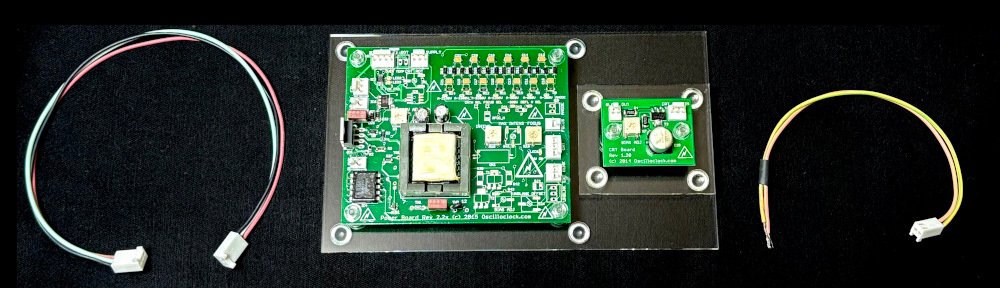
The Z Core (in this case, a Z Core 2 Ex) …
… joins the Oscilloclock Core family!
How to install it
Believe it or not, the minimal installation requires just 3 steps. For almost any oscilloscope! The Z Core effectively sits in series between your device’s blanking supply and the CRT grid.
Snip the wire connecting to CRT grid.
Connect the orange wire from the Z Core to the circuit side of the cut wire.
Connect the green/yellow wire to the CRT grid.
Snip.Connect!
Visit the Z Core Support Page for lots more detail, including the obligatory warnings about high voltage. There are also details on how to connect the Z Core to your controller, detailed specifications, and some fun Q&A to help answer your most burning questions!
The Z Core 2 Ex!
We’ve wanted to develop a dedicated, built-for-purpose Z Core product for a very long time. This would consist of a single, miniaturised, low-power board called (ingeniously) a “Z Core Board”, and a few harnesses.
But [Chris] didn’t want to wait for Oscilloclock labs to work through its ever-growing bucket list. Could we deliver within 2024?
Yes!
In past retrofits such as the Kikusui 537, we’ve taken spare boards that were originally designed for fully-featured Oscilloclocks, and partially populated them with only the necessary components to serve the blanking purpose.
Partially populated Oscilloclock Power Board
For [Chris], we found an almost fully-populated new-old-stock Power Board v2.27 and compatible CRT Board v1.21 lying around, just dying to be used and loved by someone. Older revision boards do tend to be set aside, as folks want the latest and greatest.
With just a few minor modifications, this assembly shipped – and is now branded as the Z Core 2 Ex. The “2” refers to the Power Board’s major revision, and the “Ex” stands for “external blanking amplifier” (the function of the CRT Board). The Power Board rev2.2x series boasts an on-board blanking amplifier, but this section wasn’t already populated. What a great opportunity to use up a stock CRT Board!
[Chris] will be happy. And we’ll keep up this spirit of minimising waste. You’ll see some other Z Core assemblies popping up in future: a Z Core 1 Ex, a Z Core 2, and potential variations of Z Core 3’s.
And finally, one day, a genuine dedicated Z Core will be born!
Why your scope needs a Z Core …
Many old oscilloscopes simply don’t have any input for Z blanking, Z axis, intensity modulation, or cathode modulation. (Look carefully – it goes by many names!) Or, the input may be there, but it’s not compatible with a microcontroller. Why couldn’t the designers offer a decent interface?
Well, it all has to do with high voltage! To get there, let’s cover how CRTs work in just three short sections:
Gun
A cathode-ray tube (CRT) has an electron gun that shoots electrons at the phosphor molecules on the screen. The electron beam is deflected by putting positive and negative voltages into electrodes placed in the CRT’s neck, and this is how patterns are drawn on the screen.
This is how a CRT works. It’s awesome.
But the electron beam has to be turned on and off, to break the pattern and make meaningful images on screen. This is known as blanking.
Blanking
Oscilloscopes, particularly, have to blank the beam when it goes back (retrace), from the right to the left again. If there were no blanking, you’d see a retrace line – wickedly cool for us artists, but devastatingly distracting for engineers who want to focus on the waveform itself!
Retrace lines – arty but not desirable
Oscilloclocks also rely on blanking. In Circle Graphics, where all figures are composed of lines and circles, blanking is crucial to creating meaningful segments. For example, a “C” is readily created from an ellipse “O”, simply by blanking the beam at just the right place!
A blanking pulse kills the beam to get a ‘C’
Grid
CRTs are designed for blanking. There’s a valve-like electrode called a grid that sits inside the gun, just in front of the cathode where the electrons are spat out. If you inject a negative voltage into the grid (compared to the cathode), it repels those electron babies and sends them back where they came from. They don’t bombard the screen, and no more light is emitted. Blanking in action!
Titillating! Electron field density is reduced when a negative voltage is applied to the grid!
A fuller explanation – from The Bible
The bible
A change in grid voltage influences the field distribution of the first lens, and in so doing controls the emission from the cathode. For any fixed value of voltage applied to anode 1, it influences the number of electrons which pass through the cross-over point. Let us see how this comes about. In Fig. 5-17 is shown the field distribution in the first lens for two values of grid bias, O and -30 volts, and a fixed value of voltage on the plate.? It is clearly evident that with zero bias, the area adjacent to the cathode, between the cathode and the control-grid aperture, has a comparatively high positive potential as the consequence of the field between the control grid and the first anode. Under such conditions of zero grid voltage, it has been found that the area of the cathode which is emitting corresponds approximately to a projection of the area of the grid aperture; the maximum number of electrons are passing through the grid opening and the beam-current density is high.
When the control grid is made negative by an increase in the bias, —30 volts in the illustration, the field distribution in the vicinity of the cathode is altered so that only the center of the emitting surface is behaving as an emitter. The other areas are influenced by the space charge and effectively are not emitting. The result is a reduction in beam density and several other related effects.
High voltage
So – back to the high voltage aspect. The cathode and grid are usually about 2kV (that’s right – 2,000 volts!) negative compared to the rest of the circuits. If you connected an external input signal directly to the grid, something would fry.
Old-school oscilloscope designers took a very easy (read: cheap) solution: they stuck a high voltage capacitor between the grid (or cathode) and the external signal. This is called AC coupling because the capacitor blocks the DC voltage (2kV), and only couples through the AC (the fluctuating blanking) component of the signal.
AC coupled external intensity modulation in the Conar 255 (L) and the Trio CS-1554 (R)
This method of intensity modulation was fine for the regular, repeating signals observed in old TVs and radios. But it isn’t what [Chris], or so many millions out there like him, needs! They need to send through an irregular, sometimes not-fluctuating-at-all (i.e., DC) signal. They need DC coupling! And it has to be isolated – standing off more than 2kV!
And there’s another voltage related problem: the grid has to go substantially negative with respect to the cathode, in order to completely block the electron flow. We’re talking 20-50V typically. This is not a voltage that a modern microcontroller board will deliver! This requires an amplifier.
Summing it up
So that’s it! Just three(?) words. We need an isolated DC-coupled amplifier. And it needs 2kV isolation with a 10x amplification factor.
Welcome to the Z Core!
Demo
No assembly can leave our lab without being fully tested, and without a demonstration to ensure the customer’s utmost satisfaction. Here’s how the demo went:
The host device: Trio CS-1554
This venerable Trio (also branded as Kenwood) hails from around the same era as the Conar 255. It was attractive, had fairly good specifications, and a low(-ish) price tag, making it very popular both in Japan and overseas. Documentation is freely available and… more importantly, I had one lying around!
Look carefully – it’s bulging and leaking!
Of course this device is full of high voltage oil capacitors. These were effective in their day, but they break down over time, and things get very nasty. One particular HV capacitor in this unit was overheating to the point that the metal case had warped, and oil was even leaking out! Ick.
A few modern-day capacitors hacked together replaced the leaky unit and saved the day. Onwards!
Connect Z Core outputs to Trio CRT grid and grid circuit (as shown in earlier section)
Incompatibility! The Trio’s horizontal input seemed to want 10V peak-to-peak for maximum deflection (this is way off its original specs of 250mV/cm. I think it’s broken!) The Connect by default has only a 3V peak-to-peak output signal. The image is going to be small… ↩︎
Trickery! The Connect by default is designed for a display device with a high-impedance Z input. The Z Core 2 Ex has a low-impedance input and 15mA drain at 5V. A temporary mod was needed in the Connect – which was promptly reversed after the test. ↩︎
The result? A relatively clean image, albeit small! But the blanking works well. [Chris] was okay with the jagged edges and other blemishes; these are attributable to the Trio’s rough condition.
Performance testing
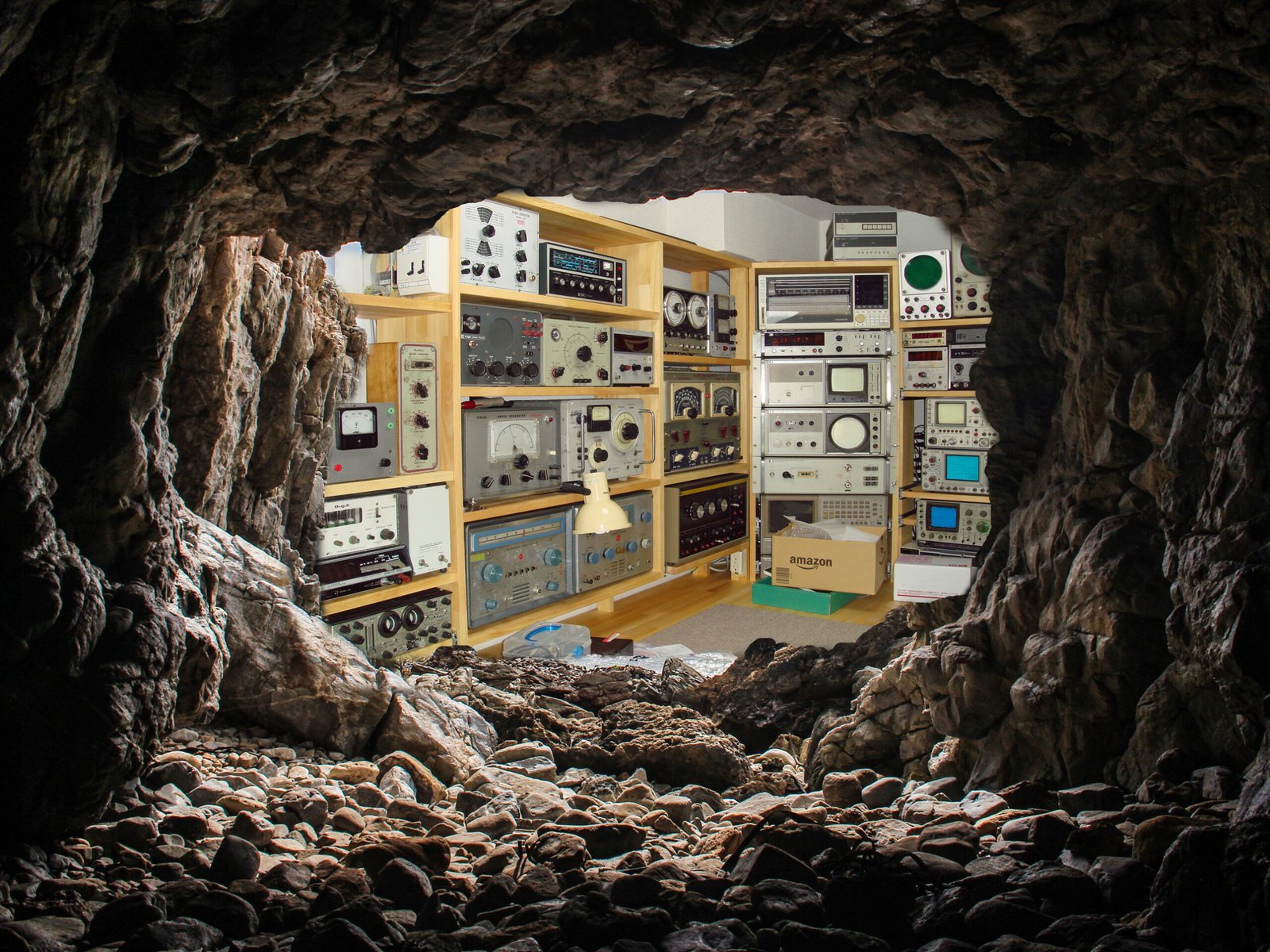
The Oscilloclock cave is not a precision testing laboratory. But we do have a significant collection of equipment, and every piece plays its part. In this case, we deployed a Hewlett Packard 1901A Pulse Generator.
Choosing amongst a plethora of delightful old oscilloscopes, we stayed with the HP theme and used a venerable but still digital HP54615B.
Set output to 5V and connect to the Z Core’s input
Connect a 20pF capacitor across the Z Core’s output, via the standard 200mm 22AWG harness
Connect Ch1 of the scope to the input, Ch2 of the scope to the output
Results
Measurement
Assembly: Z Core 2 Ex
Waveform base voltage
-46V
Rise time
130 ±10 ns
Fall time
180 ±10 ns
Propagation delay
120 ±10 ns
Effective bandwidth
DC to 3 MHz (limited by rise/fall time)
These results were satisfactory. But at some point, we’ll try the same with a Z Core 1 and a Z Core 3. And one day – a purpose-built pure Z Core. Stay tuned!
In conclusion
Well, that’s a wrap! The tested assembly has now shipped, and soon [Chris] will be able to try out a Scopetrex on his minimally-modified Conar oscilloscope. Fingers crossed!
For more technical info, fun facts and Q&A, check out the Z Core Support page. And for a peek at our range of gadgets, be sure to check out the Gallery.
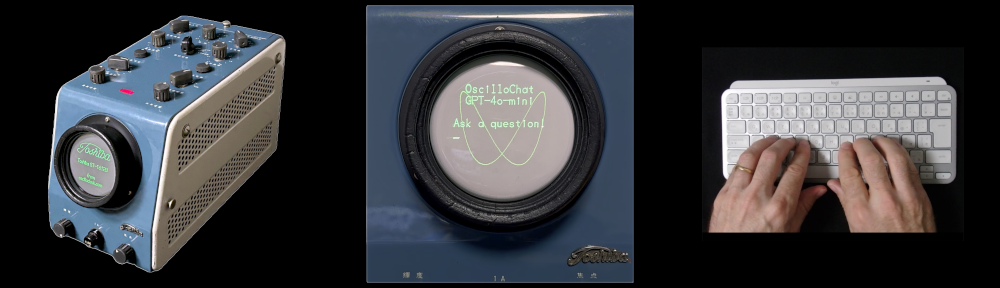
Here’s a rare thing: Take the Toshiba ST-1612B Oscilloclock. Run the OscilloTerm VT52 terminal feature. Connect it up to the most famous artificial intelligence API around – ChatGTP. And what do you get? OscilloChat!
Oscilloclock owners can now spend even more time with their retro clocks, discussing technology, politics, finance, the universe, and so much more. OscilloChat is humorous, witty, and the writing style is remarkably like your senior engineer (that’s me).
At best, this is eerily entertaining. At worst, it’s annoying and entirely untrustworthy! Let’s see what happened when I asked: “What’s your favourite Oscilloclock?”
To see this and more incredible videos in high resolution, check out Oscilloclock on YouTube!
They don’t call it generative AI for nothing. Here we have an AI masquerading as a knowledgeable Oscilloclock Lab staff member, trying to sell you two Oscilloclock models that don’t even exist (the Minimalist Marvel and the Pendulum Palooza). And when challenged with “Is it real?” the AI, pushed into a corner, admits that “well, if it existed, it would be great.” It’s like dealing with a child.
The fictitious “Pendulum Palooza” Oscilloclock
But like we do with children, let’s give OscilloChat a chance! Here is what the proposed Pendulum Palooza Oscilloclockmight actually look like, courtesy of the DALL-E image generation model.
Dear readers, please draw your own conclusions!
How it works
The OscilloChat experiment setup is simple. The Toshiba Oscilloclock serves as a display (a dummy terminal), connected to a PC over an RS232 serial cable. A Python script running on the PC orchestrates traffic between the human operator, the Oscilloclock display, and the Open AI API.
Interaction with the GPT AI
The Python script first creates a session with the GPT AI. It then sends an instruction telling the AI what it is; i.e., to give it a role, including any specific instructions that it needs to follow in the subsequent conversation with the human:
"You are an assistant at Oscilloclock.com. You will be asked questions about any topic. Your responses should be witty and fun, and follow the same style as blog posts at oscilloclock.com web site. Responses should be short (within 512 characters). You can ONLY use ASCII characters! Do NOT use non-ASCII punctuation marks. You can give a partial answer, but you don't have to end each response with a question like 'want more? just ask!'"
Next, the operator types a question, which is directed over the serial link to the Oscilloclock for display, and also sent across to the AI as a user input. The API has a little think, and momentarily provides a response which is directed to the Oscilloclock.
Until the session is closed (e.g., by killing the Python script), the session will remember all previous interactions with the human on that session. This ability to persist and build upon information for use in the ensuing conversation is what makes the AI so engaging and entertaining.
Delay effects
Each response back from the AI is sent character by character to the Oscilloclock display over the serial link. But even at 9600 baud (a turtle’s pace, by any modern standard!), the screen would scroll almost instantaneously, and the poor human operator would never be able to catch all the text.
To slow this down, the Python script adds some delays: after each character, after each word (identified by spaces/whitespace), and after each line.
Besides making things easy for the operator, it also gives a neat impression that the AI is thinking while composing its replies!
Lissajous Watermark
Plain character displays can get boring. Happily, Oscilloclock Lab has a solution for every kind of ‘boring’! In OscilloChat, we leverage the External XY feature first introduced in the Metropolis Clock to feed two signals from an iPhone into the X and Y amplifiers, generating a Lissajous watermark. What a way to make a dumb terminal display look smart!
Dissecting the dribble
If you want to dissect OscilloChat’s dreadful dribble in detail, here’s the full transcript:
Hi, tell me about yourself!
Ochat: Well hello there! Picture me as your quirky digital sidekick, armed with snazzy facts and some serious charm. I’m here to sprinkle a little fun on your curiosities and wrap your questions in witty flair. Think of me as the zany clock in your atticalways (sic1) ticking, forever colorful, and here to help you find the right time for any topic! So, what tickles your fancy today?
What is your favorite oscilloclock?
Ah, the grand question of favorites! While I can’t cozy up to a specific oscilloclock like a warm cup of cocoa, each one boasts its (sic2) unique charmlike (sic3) a carnival of timepieces! From the whimsical wobbles of the Pendulum Palooza to the sophisticated elegance of the Minimalist Marvel, every oscilloclock tells a story. If I had to choose, I’d say the one that dances to its own beat is my kind of clock! Ready to find your oscilloclock soulmate?
Tell me more about the Pendulum Palloooza (sic) Oscilloclock… is it real?
Ah, the Pendulum Palooza Oscilloclock(sic4) it sounds like a time-traveling festival, doesn’t it? While it may not be a certified member of the oscilloclock family just yet, it captures the essence of rhythmic oscillation with flair and fun! Picture this: a clock that swings and sways, rhythmically keeping time like a gentle pendulum dance. If only it existedwho (sic5) wouldn’t want to host a party where every tick-tock brought a new groove? Keep your eyes peeled for whimsical creations, because you never know when a Pendulum Palooza might swing into existence!
Nice! thanks for the feedback
Anytime, time traveler! I’m always here to sprinkle some fun on your quest for knowledge. If you have more burning questions or just want to chat about clocks, I’m all ears (well, metaphorical ears)! Keep ticking and tocking along with curiosity!
Missing dash (technically an em dash, Unicode U+2014). This should read “… attic — always …” ↩︎
Missing dash. This should read “… charm — like …” ↩︎
Missing dash. This should read “… Oscilloclock — it ….” ↩︎
Missing dash. This should read “… existed — who …” ↩︎
You can see from the footnotes that the AI is responding with non-ASCII characters. These cannot be displayed (yet!) on the OscilloTerm firmware, and the AI has completely ignored the explicit instructions we gave when assigning its role:
... You can ONLY use ASCII characters! Do NOT use non-ASCII punctuation marks. ...
But scolding the AI about this results in a childish non-apology, and quick change of subject:
You were NOT supposed to use any non-ASCII characters, like dashes or right quotation marks!
OChat: Oops! It looks like I got a bit carried away. No special characters from now on, I promise. Just plain ASCII fun ahead! What can I help you with today?
(Note: this interaction was not included in the video.)
What’s Next?
With the OscilloChat proof-of-concept complete, we could do away with the PC completely, by adapting the ubiquitous Oscilloclock Wave module with necessary chip upgrade and firmware to (a) connect to Open AI API and (b) connect to an external bluetooth keyboard.
Taking a step further, we could do an OscilloChat2 (OscilloChat Squared) where two OscilloChats interact with each other. What would the conversation be like? Where would it lead?
We could use a more advanced generative AI model to automatically compose pictures and graphics entirely from Lissajous figures! (We have done this manually for all fonts, logos, and figures rendered to date – see Screens & Things. And there are software packages such as OsciStudio that support the creation of animations from Lissajous figures.)
Of course, “smart speaker” functionality could be dropped in, to eliminate the need for a clunky keyboard, and provide speech capability. OscilloChat could become OscilloChatty! How cool? How annoying? You be the judge!
All excellent items to add to the ever-growing list…
Credits
[Eric], the protagonist of the recently published Zork on an OscilloTerm!, noticed this at the end of the post:
He just couldn’t help pick up the gauntlet! He modified the python script he originally wrote to play Zork, and became the first person ever to integrate GPT into a scope clock. Check out his own video of Zork and GPT running on his OscilloTerm!
Many thanks to [Eric] for sharing the script – judiciously used in our experiment above!
Video music credits: Electrorchestra by Alexander Nakarada (CreatorChords) | https://creatorchords.com Music promoted by https://www.free-stock-music.com Creative Commons / Attribution 4.0 International (CC BY 4.0) https://creativecommons.org/licenses/by/4.0/
Like what you see? Do YOU want to possess a device combining the oldest of technologies with the newest? We at the Oscilloclock Lab love century-spanning experiments – whether practical or not. Stay tuned for more!